
WP Theme Lesson #7: Footer

This lesson on the footer is simple. You’re going to add a DIV or invisible box under the Sidebar DIV and fill in some copyright text for the footer. Think you can do that without my instructions? Go ahead a try it. Come back to this lesson to double check.
Step 1: Add the DIV
Type the following codes under the Sidebar DIV:
<div id=”footer”>
</div>
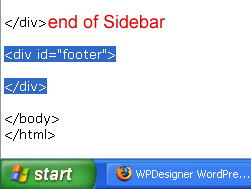
Step 2: Add footer text within paragraph tags. For this, say anything you want. Here’s my message:
<p>
Copyright © 2007 <?php bloginfo(’name’); ?>
</p>
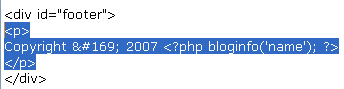
Save notepad and refresh browser. Here’s the result:

If you didn’t use the footer text above, © is the code for displaying the copyright sign. Also, remember the bloginfo() function that you used when putting the header together? I used it again for the footer. ‘name‘ calls for the blog’s title and ‘url‘ calls for the blog’s address.
If you want the blog’s title to be a link, check the header to remember how you did it.
Follow this WordPress Theme Tutorial Series from the beginning.



Comments (0)
Share a useful question or correction. Please read our comments policy before posting.